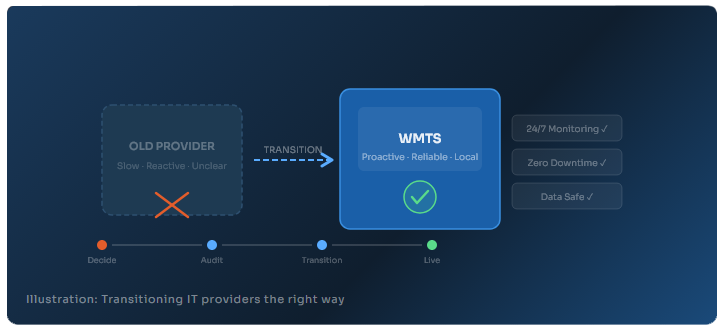
A plain-English guide for West Michigan business owners who are done settling for slow, reactive IT support.
You already know something is off. Maybe your IT company takes two days to respond to a support ticket. Maybe you are paying for "proactive" monitoring, but still get surprised by outages. Or maybe the technician who shows up barely seems to know your setup. Whatever the reason, you have started asking the question every business owner eventually asks:

The good news: switching IT providers is far less disruptive than most businesses fear. With the right process, you can transition to a new managed IT services partner with zero downtime, no data loss, and no chaos. This guide walks you through exactly how to do it, step by step.
Before we get into the how, it helps to name the why. In our experience working with businesses across West Michigan, the most common reasons people finally make the move include:
✔ Slow response times, tickets go hours or days without a meaningful reply
✔ Reactive-only support, problems get fixed after they cause downtime, never before
✔ Unclear or confusing billing, charges that are hard to predict or explain
✔ Feeling like a small fish, your account gets deprioritized as the MSP grows
✔ No strategic guidance, your IT company fixes things but never helps you plan
✔ Security gaps, you are not confident your business is actually protected
If two or more of those sound familiar, you are not being too demanding. You are recognizing that your technology partner is no longer serving your business. That is a reasonable conclusion, and acting on it is the right call.
Review your current contract before anything else
Pull out your existing IT service agreement and look for three things: the termination notice period (typically 30–90 days), any data ownership clauses, and exit fee provisions. You need to know your timeline and what you are legally entitled to before giving notice. Do not skip this step; it prevents nasty surprises later.
Inventory your IT environment, with your new provider
A reputable new IT partner will conduct a full environment audit before your transition begins. This includes all hardware assets, software licenses, cloud services, network infrastructure, security tools, backup systems, and user accounts. If a prospective MSP does not offer this upfront assessment, that is a red flag. At WMTS, we complete this audit at no cost as part of our onboarding process.
Secure your data and credentials before giving notice
This is the most important step most businesses overlook. Before your current provider knows you are leaving, make sure you have secure access to: your domain registrar login, Microsoft 365 or Google Workspace admin credentials, firewall and network device passwords, and any third-party vendor logins your IT company manages on your behalf. Your IT systems belong to your business, not your IT vendor. Make sure you can prove it before the conversation happens.
Give formal written notice to your current provider
Once your data and credentials are secure and your new provider is ready, send a written termination notice in accordance with your contract terms. Keep the communication professional and brief. You do not owe a detailed explanation. Request a formal offboarding checklist from your outgoing provider and document every step of the handoff in writing.
Run a parallel period before full cutover
A well-structured transition includes an overlap window, typically two to four weeks, during which your new IT provider documents and monitors your systems before the old provider's service ends. This is when your new MSP installs their remote monitoring and management tools, sets up your helpdesk workflows, and verifies that backup systems are fully functional. Think of it as the new team shadowing the handoff before going live.
Communicate the change to your team
Your employees need to know who to call, how to submit a support ticket, and what to expect from day one with the new provider. A simple internal announcement, even a one-paragraph email, prevents confusion and sets the tone for a positive working relationship. Your new IT partner should provide you with a simple onboarding template for this.
Not all managed IT services companies are created equal. As you evaluate options, here are the questions that separate the good providers from the great ones:
✔ Do they offer a written SLA (service level agreement) with guaranteed response times?
✔ Is their support truly 24/7, or just business-hours with an emergency line?
✔ Do they provide a dedicated point of contact, or a rotating help desk queue?
✔ Can they show you references, testimonials, or case studies from businesses similar to yours?
✔ Do they include cybersecurity tools in their base pricing, or is it all add-on?
✔ Will they provide vCIO-level guidance to align IT with your business goals?
✔ Are their technicians certified (CompTIA, Microsoft, vendor-specific credentials)?
A great IT provider does not just keep the lights on. They help you make smarter technology decisions, protect your business from threats you may not even know exist, and grow with you as your needs evolve.
The number one reason businesses stay with a bad IT provider too long is fear of disruption. It is worth addressing that fear directly: in a properly managed transition, your day-to-day operations should not be affected at all. Your team keeps working. Email keeps running. Files stay accessible. The switch happens in the background, managed by professionals who do this routinely.
The transitions that go sideways are almost always the ones done without a plan, where a business cancels their current provider impulsively and figures out the next step later. The process outlined in this guide exists precisely to prevent that scenario.
At West Michigan Technology Services, we have guided dozens of Grand Rapids businesses through IT provider transitions. Not one of them experienced meaningful downtime during the switch. The process works when both sides follow it.
How long does it take to switch IT providers?
Most transitions take between 30 and 60 days from the time you give notice to the time your new provider is fully operational. The actual overlap, where your new MSP is live and running, can happen in as little as one to two weeks.
Will I lose any data when I switch IT companies?
Not if your transition is handled correctly. A professional onboarding includes verifying that all backups are intact and accessible before the old provider's access is terminated. Data loss during a transition is a sign of a rushed or unplanned handoff, not an inevitable risk.
What if my old IT provider is uncooperative during the exit?
This is rare but does happen. The best protection is having your own admin credentials secured before giving notice (Step 3 above) and having your transition documented in writing. If your old provider holds your data hostage or refuses to cooperate, that is a legal matter, and another sign you made the right decision to leave.
Is switching IT providers expensive?
The transition itself should not cost you significantly. A reputable new IT provider absorbs onboarding costs as part of winning your business. The real cost of staying with the wrong provider, in downtime, security risk, and wasted IT spend, is almost always far greater than the cost of making a change.